Embed-Fields
In this Page, you can Edit your Embed Fields for the Server Information Channel Module. You can only add up to 25 Embed Fields, but you can edit and delete them at any time. Each Embed Field has a Name, Value and an option to display it inline or not. The Name is the title of the field, the Value is the content of the field and the Inline option determines whether the field should be displayed next to other fields or on a new line.
Here is an example:
with inline fields:
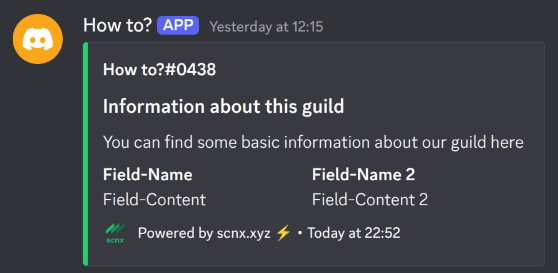
without inline fields:
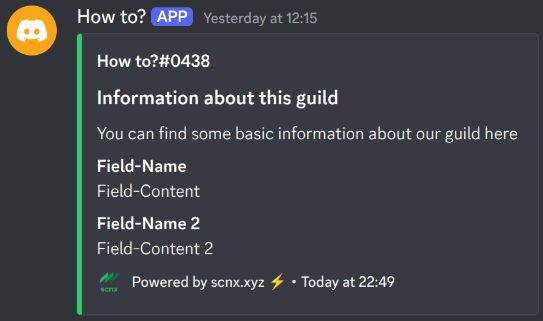
Field-Name

type: String
required: true
The Name is the title of the field and is required. It should be a short and descriptive text that summarizes the content of the field. For example, if you want to display the number of members in the server, you can set the Name to "Members".
Field-Content

type: String
required: true
The Value is the content of the field and is required. It can be any text that you want to display in the field. There are some placeholders that you can use:
%memberCount% - Member-Count of this guild
%botCount% - Bot-Count of this guild
%userCount% - User-Count of this guild
%onlineMemberCount% - Count of online members on this guild
%daysSinceCreation% - Count of days passed since the creation of this guild
%guildCreationTimestamp% - Show when the guild was created
%guildBoosts% - Show how often this guild was boosted
%boostLevel% - Shows the current boost-level of this guild
%boosterCount% - Count of boosters on this guild
%channelCount% - Count of channels on this guild
%roleCount% - Count of roles on this guild
%emojiCount% - Count of emojis on this guild
%newline% - Inserts a new line
%userWithRoleCount-<ID>% -Count of members with a specific role (replace "<ID>" with an actual role-id)
%onlineUserWithRoleCount-<ID>% - Count of members with a specific role who are online (replace "<ID>" with an actual role-id)